728x90
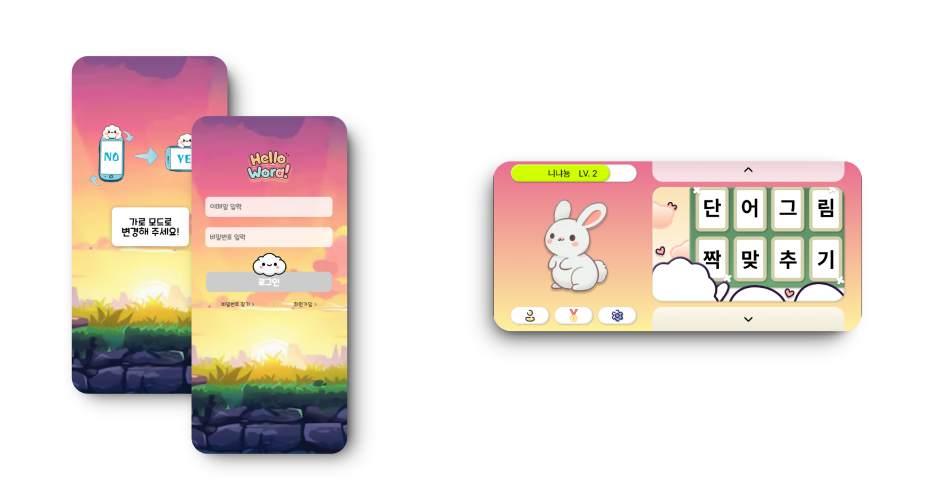
HelloWord 프로젝트는 기본적으로 가로모드로 개발되었는데 중간에 회원가입 및 로그인을 세로로 바꾸자는 의견이 나왔다. 갑작스러운 제안이었지만 모바일에서 가로화면으로 입력하는 것에 대한 불편함에 대해 인지하고 있었기 때문에 변경을 팀적으로 결정했다.
이미 가로화면에 기반하여 모든 코드가 개발되어 있었기 때문에 반응형으로는 구현하기 어렵다고 판단했고 UX적으로 어떻게 하면 자연스러울까 고민하던 중 화면의 방향을 감지해서 회전유도를 해야겠다는 생각이 들었고,
`portraitModeWarning`, `landscapeModeWarning` 컴포넌트를 구현했다
화면 방향 감지 로직
const checkOrientation = () => {
  if (window.screen && window.screen.orientation) {
    setIsPortrait(window.screen.orientation.type.includes('portrait'));
  } else {
    setIsPortrait(window.innerHeight > window.innerWidth);
  }
};
기본적으로 `Screen Orientation API` 를 우선적으로 사용, 지원하지 않는 브라우저를 위해 윈도우 크기 비교를 풀백으로 사용 (else)
이벤트 리스너 설정
화면 방향 변경을 감지하기 위해 이벤트 리스너를 설정
useEffect(() => {
  // 초기 방향 확인
  checkOrientation();

  if (window.screen && window.screen.orientation) {
    window.screen.orientation.addEventListener('change', handleOrientationChange);
  } else {
    window.addEventListener('resize', checkOrientation);
  }

  // 클린업 함수
  return () => {
    if (window.screen && window.screen.orientation) {
      window.screen.orientation.removeEventListener('change', handleOrientationChange);
    } else {
      window.removeEventListener('resize', checkOrientation);
    }
  };
}, []);
컴포넌트 마운트 시 이벤트 리스너를 추가하고, 언마운트 시 제거하는 방식을 선택
조건부 렌더링
if (!isPortrait) return null;

return (
  <>
    <div className="modal-background" onClick={(e) => e.stopPropagation()} />
    <div className="rotation-warning">
      가로 모드로
      <br />
      변경해 주세요!
    </div>
  </>
);
두 컴포넌트 모두 조건부 렌더링을 사용하여 필요한 경우에만 경고 메시지를 표시
import PortraitModeWarning from '../features/Games/portraitModeWarning';

return (
  <>
    <PortraitModeWarning />
  </>
)
재사용성을 고려했기 때문에, 화면 전환이 필요한 자식 컴포넌트에서 렌더링 부분에 불러서 사용
portraitModeWarning 컴포넌트
import React, { useState, useEffect } from 'react';
import './portraitModeWarning.sass';
import rotatephone from '../../assets/character/rotatephone.png';

const PortraitModeWarning = () => {
  const [isPortrait, setIsPortrait] = useState(false);

  useEffect(() => {
    const checkOrientation = () => {
      if (window.screen && window.screen.orientation) {
        setIsPortrait(window.screen.orientation.type.includes('portrait'));
      } else {
        setIsPortrait(window.innerHeight > window.innerWidth);
      }
    };

    checkOrientation();

    const handleOrientationChange = () => {
      checkOrientation();
    };

    if (window.screen && window.screen.orientation) {
      window.screen.orientation.addEventListener('change', handleOrientationChange);
    } else {
      window.addEventListener('resize', checkOrientation);
    }

    return () => {
      if (window.screen && window.screen.orientation) {
        window.screen.orientation.removeEventListener('change', handleOrientationChange);
      } else {
        window.removeEventListener('resize', checkOrientation);
      }
    };
  }, []);

  if (!isPortrait) return null;

  return (
    <>
      <img className="rotation-img" src={rotatephone} alt="회전" />
      <div className="modal-background" onClick={(e) => e.stopPropagation()} />
      <div className="rotation-warning">
        가로 모드로
        <br />
        변경해 주세요!
      </div>
    </>
  );
};

export default PortraitModeWarning;'FE > React' 카테고리의 다른 글
| [React / 프로젝트] Context API 사용으로 테마음악 구현하기 (0) | 2024.12.01 |
|---|